
10 trades free, no card

Know your numbers.
Own your edge.

You log the trade by hand. Killzonda works out the calendar, what breaking your rules costs you, and where your edge actually is.

★★★★★ Rated 5 out of 5 by Killzonda traders
Ten trades free, counted once per account. No card, no countdown.
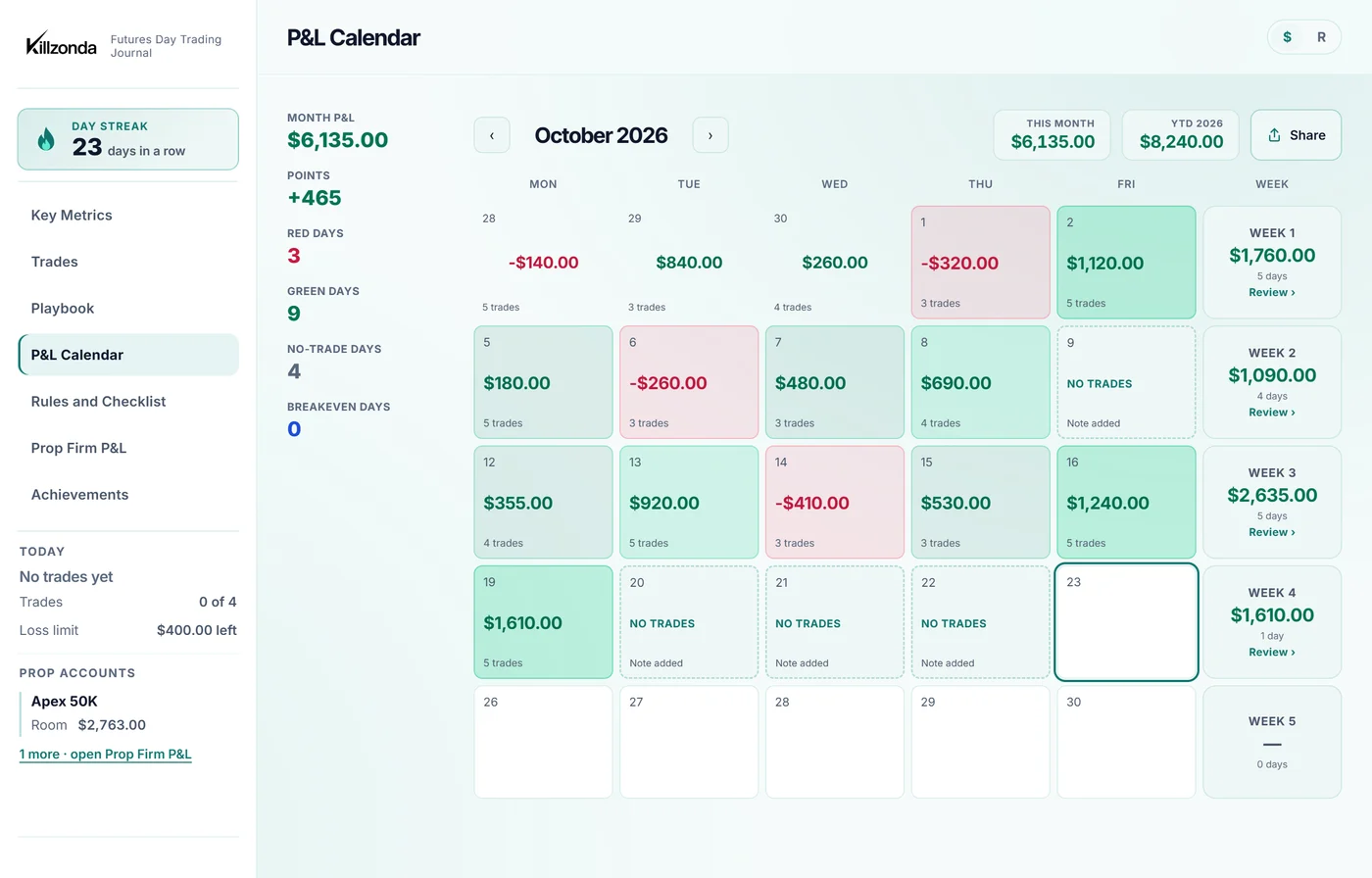
The Killzonda P&L calendar: a month of trading days in green and red with weekly totals beside them.
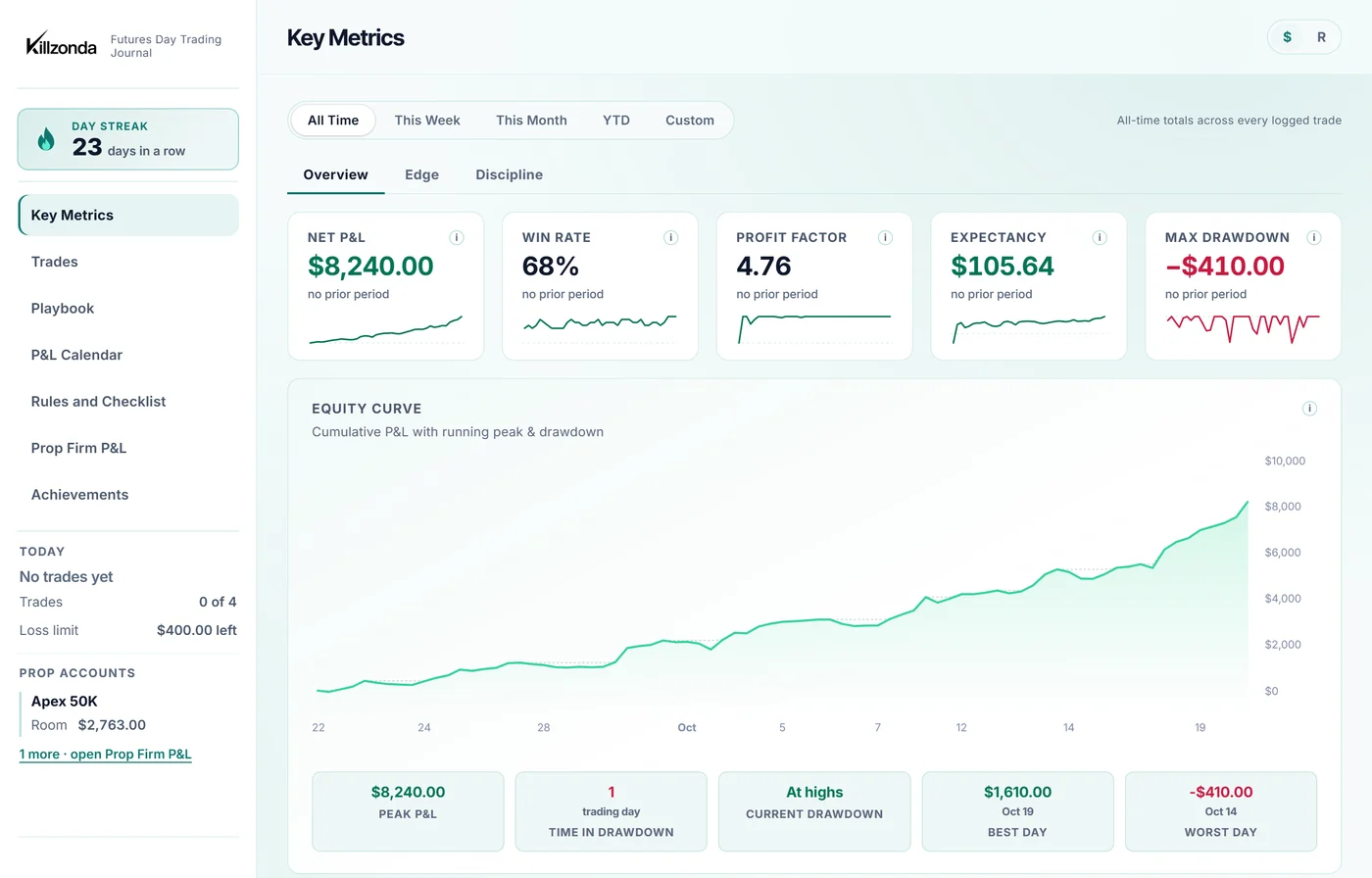
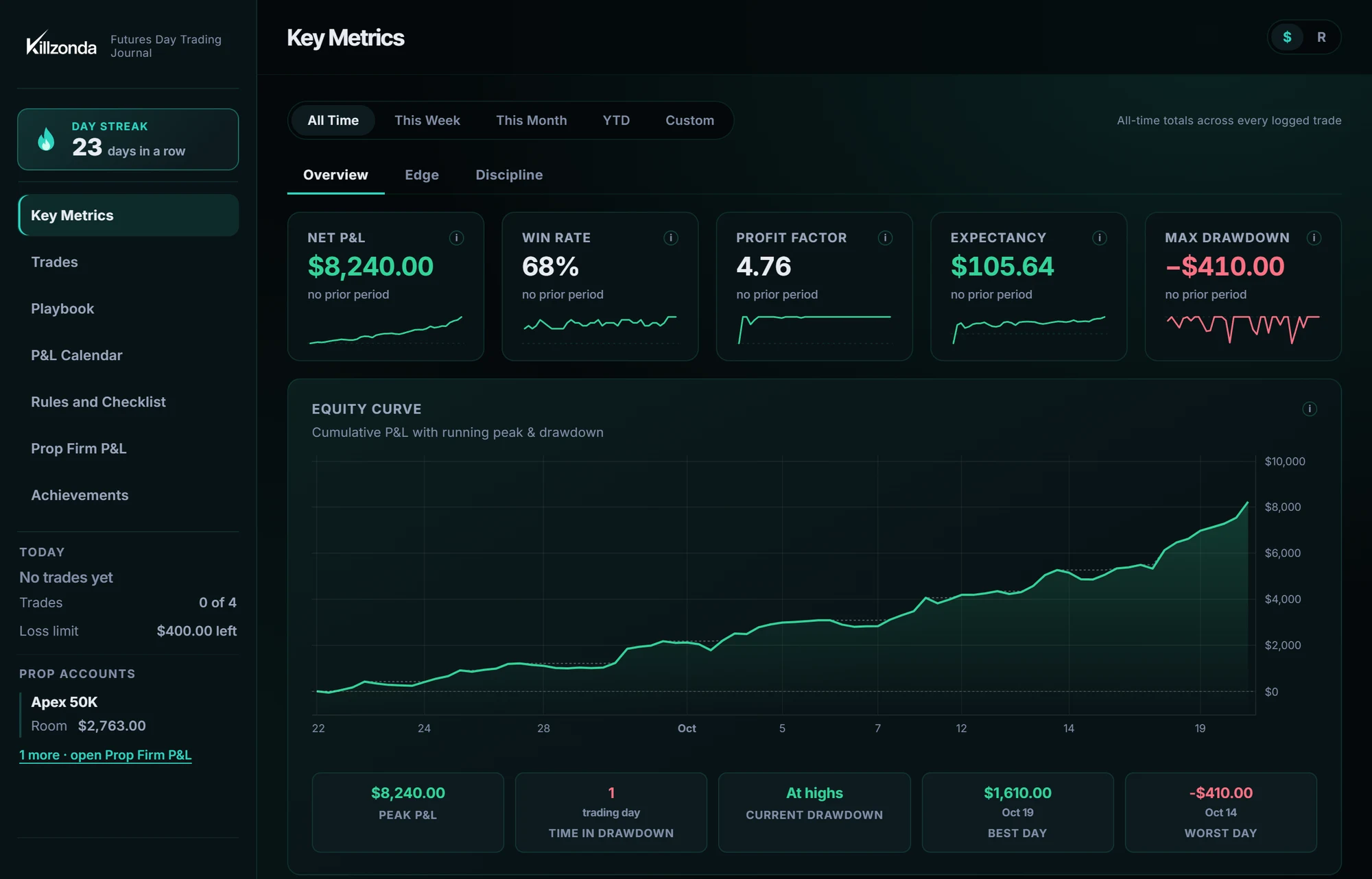
Key Metrics: net P&L, win rate, profit factor, expectancy and max drawdown above an equity curve.
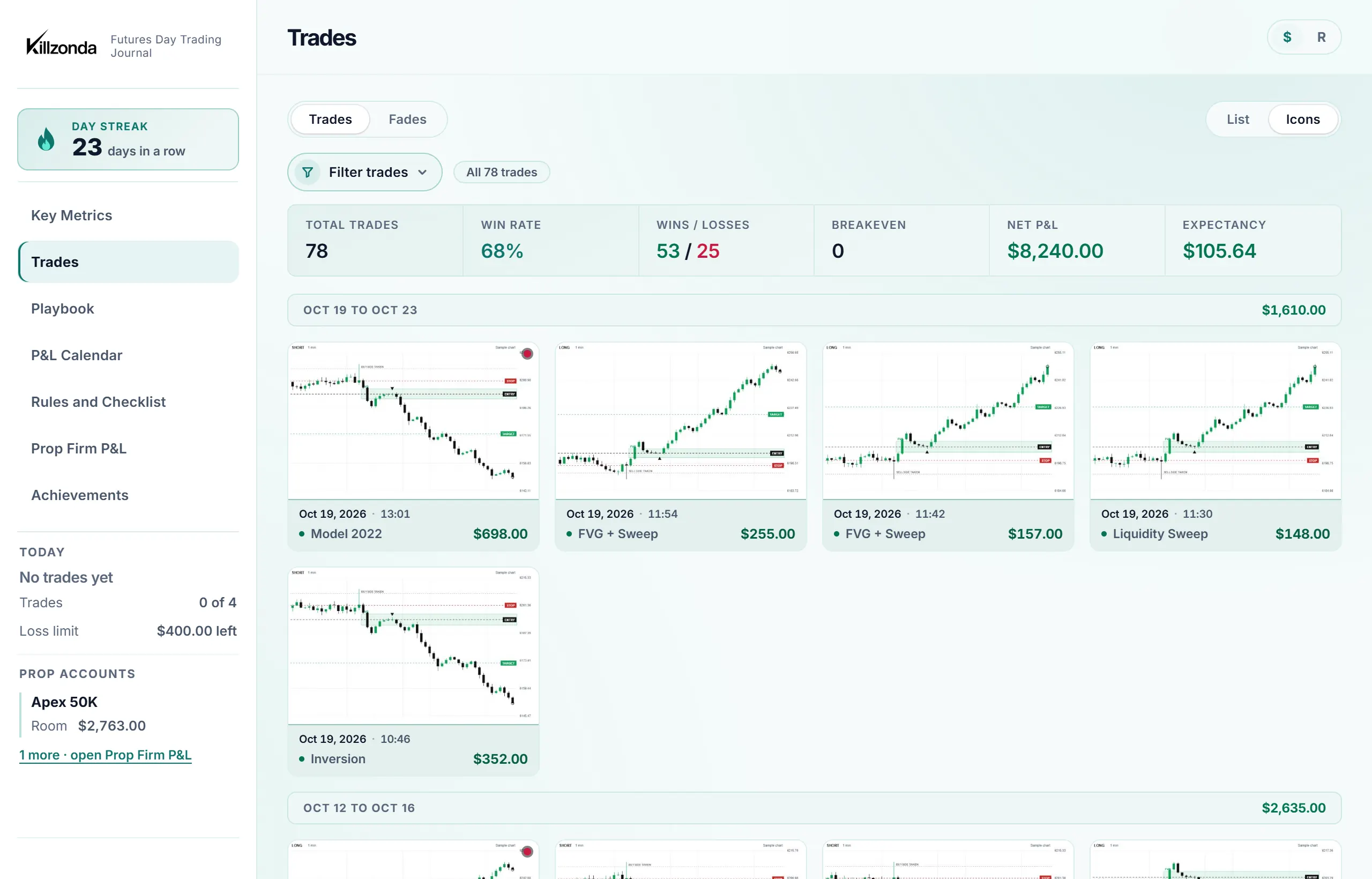
The trade log: every trade with its chart, setup, direction, result and P&L.
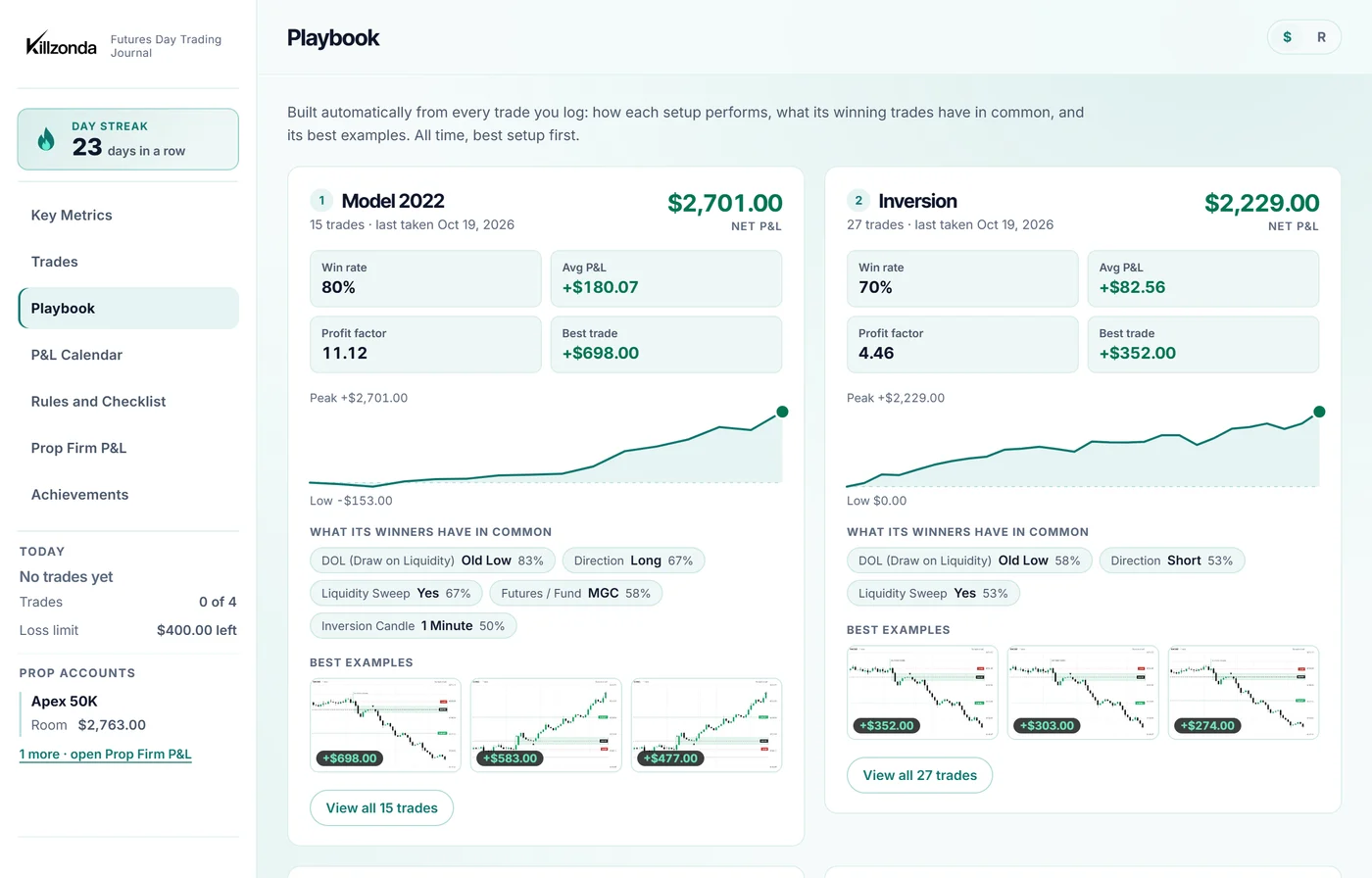
Playbook: each setup ranked by what it actually makes, with win rate, expectancy and its best examples.
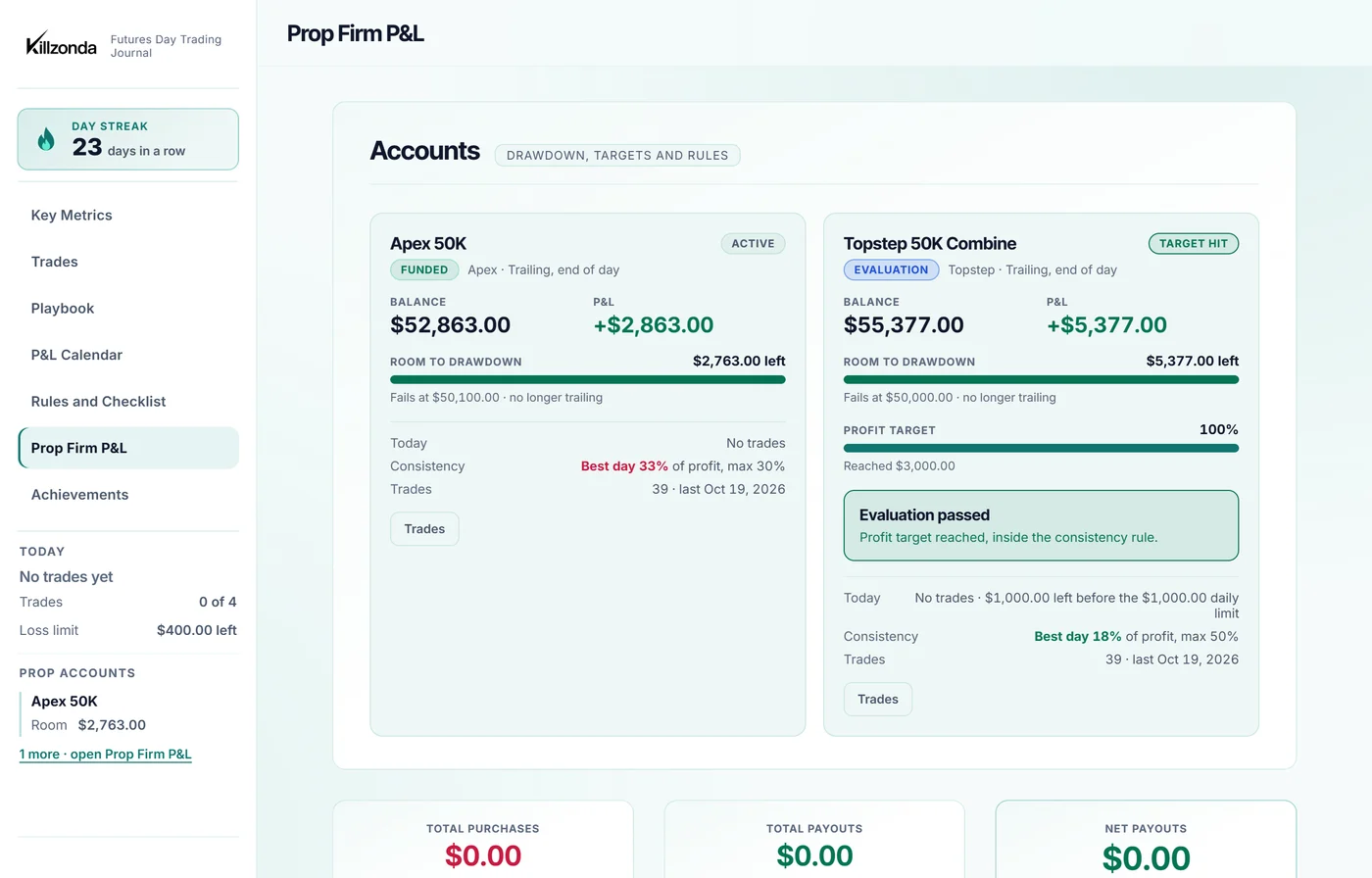
Prop Firm P&L: each evaluation and funded account with its drawdown, profit target and consistency rule.
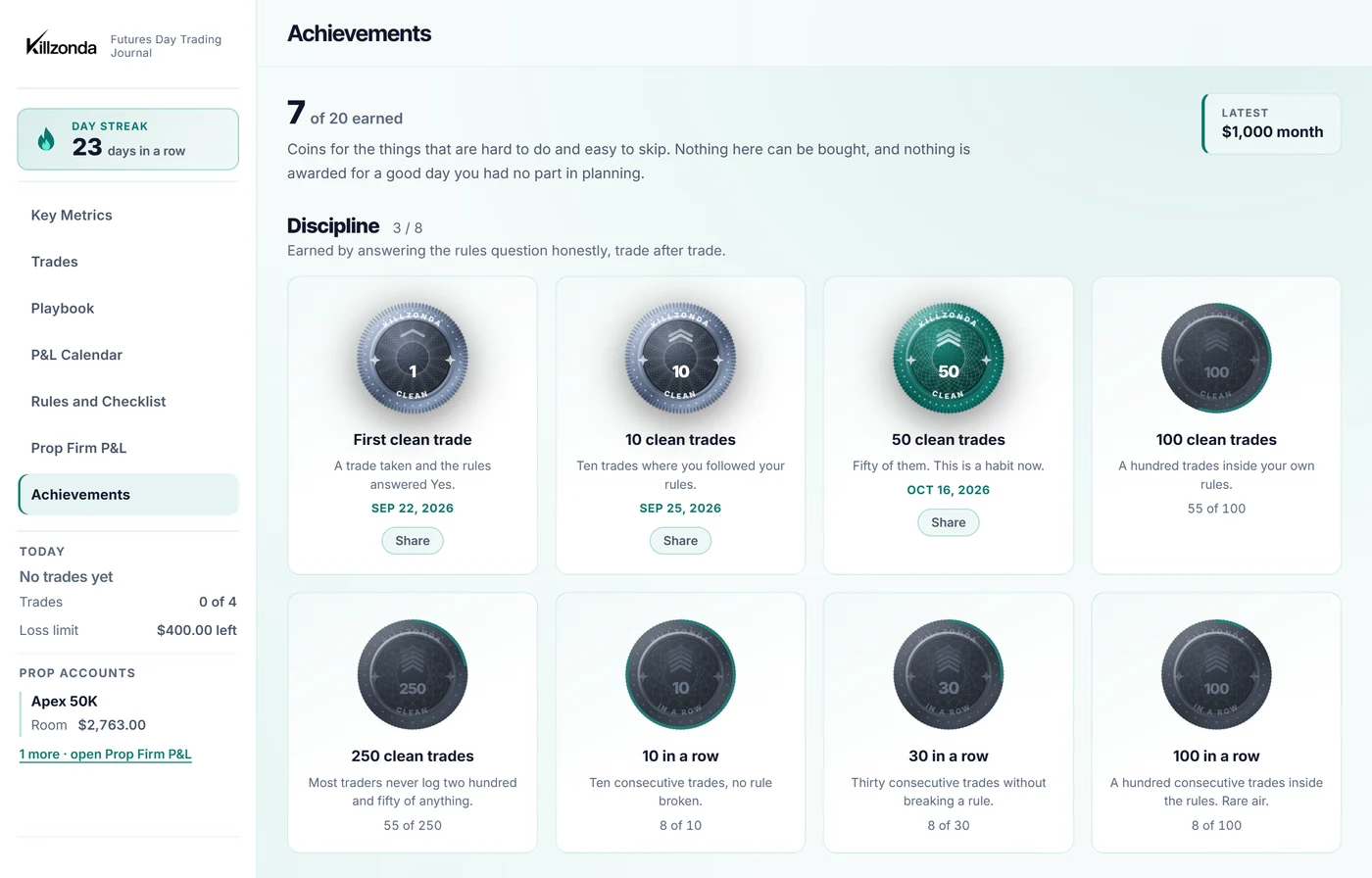
Achievements: coins earned for clean trades and consistency, with the date each was reached.
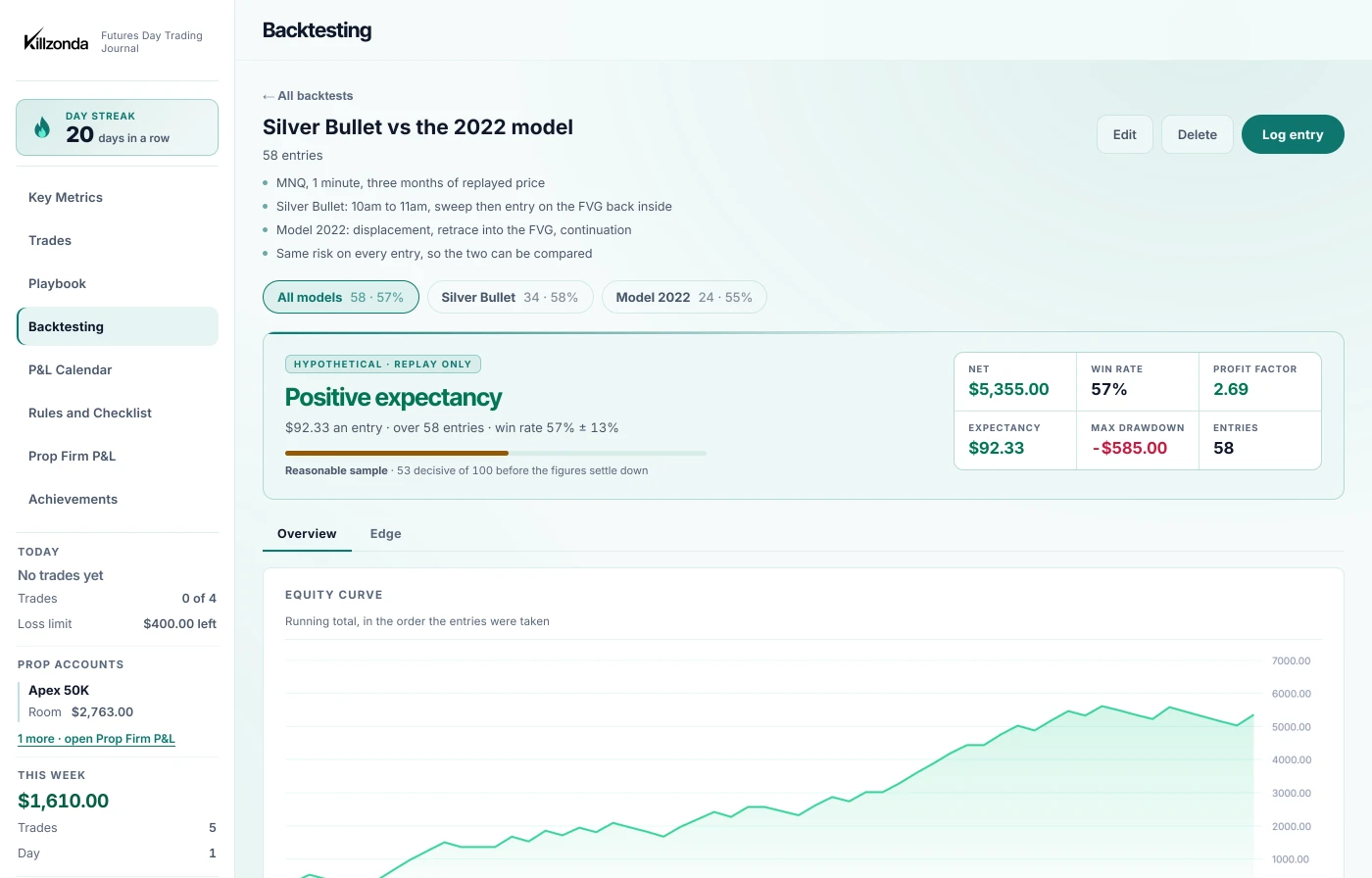
Backtesting: a replayed model with its verdict, win rate, profit factor and equity curve, and the models in the folder compared beneath it.

P&L Calendar

Set up any prop firm's rules
ApexTopstepTake Profit Lucid TradingMyFundedFuturesTradeify

You enter the drawdown type, the daily loss limit, the profit target and the consistency rule, so an account is tracked exactly the way its firm defines it.

The real thing, not a screenshot

This is Killzonda itself, loaded with a month of example trades. Click through the tabs, change the date range, sort the table, open a day on the calendar. Backtesting has three studies in it, with the entries behind them, so there is something to open there too.

Also in dark

Or keep the lights off.

Dark is where Killzonda starts. Every page, every chart and every figure has both, and the switch lives in Settings, so the journal looks the way you want it at six in the morning and at ten at night.

The same Killzonda dashboard in dark mode: net P&L, win rate, profit factor, expectancy and max drawdown above an equity curve.

Log the trade. It works out the rest.

Five things worth looking at in the demo above.

  1. Five numbers that matter. Net P&L, win rate, profit factor, expectancy and drawdown, each measured against the period before.
  2. Your curve, and what you gave back. Cumulative P&L against its running peak. The gap between the two lines is the drawdown.
  3. Every trade leads with the chart. You recognise the trade before you read a single number, with the setup and result underneath.
  4. Slice it any way you like. Filter your history by setup, session, liquidity sweep, day, rating or R:R, and read the stats for just that slice.
  5. Prop firm accounts kept separate. Evaluation fees and payouts tracked apart from trade P&L, so you know your real all-in return.

What traders are saying

Killzonda is a great platform for learning from your mistakes and finding what makes a good day a good day, and a bad day a bad one. Tracking my MAE and MFE to find my strongest draw on liquidity turned out to be far more helpful than I expected.

JerryKillzonda user

Killzonda has paid for itself many times over. Going back through my metrics and trade data showed me exactly where I was losing money, and fixing it has saved me thousands of dollars. At a price this fair, the ROI is well worth it.

TylerKillzonda user

Every feature feels like it was built by someone who actually trades. The numbers keep me honest about what is working and what is not, and I can see myself growing as a trader. For a fraction of what the big-name journals charge, it is an easy yes.

DeniseKillzonda user

Reviews from Killzonda users. Individual results vary.

Image-first trade logging Real P&L calendar Key metrics that actually matter Pre-market checklist built in
The method

Manual by design. That's the feature.

Auto-syncing from your broker sounds like less work, and it is. It is also less learning. You end up with hundreds of rows you never open again: reconciliation, not review.

The thirty seconds you spend typing in the setup, the session, the sweep and how you managed the trade is the review. It's the moment you notice you broke a rule, or that the "A+ setup" was really a B. Skip it and the journal just watches you repeat yourself.

Tick-by-tick fill data exists to audit execution latency. It will not tell you whether the trade was worth taking. Killzonda leaves it out and keeps what changes how you trade.

Manual input, automatic analysis. Every metric, the calendar and the filters update the instant you hit save.

Auto-sync journals

Every fill imported. A wall of trades you skim once. The reflection step is optional, so it doesn't happen.

Killzonda

Fewer, deliberate entries you can actually recall. The context is the point of entry, the numbers are computed for you, and a no-trade day counts too.

Discipline

The strategy is the easy part. Sticking to it isn't.

Almost nobody loses because their setup stopped working. They lose in the twenty minutes after a red trade. The size-up. The revenge entry. The setup that was close enough.

Discipline is the one variable you fully control. It is also the one most journals never measure. You can know your win rate to a decimal and still have no idea what breaking your own rules costs you, so it stays a feeling. And a feeling is easy to argue with at 9:45am.

Killzonda turns it into a number. Every trade records whether you followed your plan, and the dashboard prices that answer in dollars.

If discipline is the thing you are fighting, this is the mirror. If it is already your strength, this is the proof, and the record that holds you to it through a drawdown. That is exactly when it stops feeling obvious.

Rules vs Outcome

Mark a trade as rule-following or not when you log it. The Discipline tab shows what each column is actually worth, so “I mostly stick to my plan” becomes a figure you can check.

Your Rating vs Reality

You grade the trade when you take it. Later you see the win rate and average P&L sitting behind each grade, and find out whether your A++ has earned the name.

Rules & Pre-Market Checklist

Your core rules, confluence and risk limits live in the app, with a checklist that clears itself every morning. Thirty seconds before the open, so a bad day does not get a head start.

Backtesting

Find out whether the model works. Before it costs you.

Replaying price is how a model gets tested, and most of that work ends up in a spreadsheet nobody opens twice. In Killzonda a backtest is a folder for one idea: log the setups as you replay them, with the same fields a live trade gets, and the folder reads back as a dashboard.

Put more than one model in the same folder and they are ranked by what one entry of each is actually worth, not by which one won more often. Every entry carries its session, so you also find out when a model works, which is usually the answer that changes how you trade it.

None of it touches your journal. Backtest entries live in their own tables on their own page. They never reach your metrics, your calendar, your streak, your playbook or your prop firm accounts, and they cannot use up one of the ten free trades.

Open the backtesting demo

A verdict, and the sample under it

Positive or negative expectancy, said in a line, above the win rate with a 95% band on it and a count of how many decided entries it rests on. Twelve replays look like twelve replays instead of a 73% win rate.

Models compared

Every model in the folder ranked by what one entry of it is worth. Click a row and the whole page narrows to that model, sessions included.

The session it wants

Average per entry by session, so a model that works in the New York morning and nowhere else says so here, rather than after a month of live trading.

Built by a trader who was tired of guessing.

Killzonda started as a single-file journal for my own futures trading. I wanted to know, in plain numbers, which setups, sessions, and conditions actually made me money instead of just feeling right.

It grew into the exact tool I wished existed: fast to log, honest about breakeven days, and built around the way liquidity-sweep and inversion-based setups actually get planned and reviewed.

The philosophy Two questions decide whether you get better: did I follow my rules today, and are those rules actually making money? Killzonda is the one page, filled in after the close, that answers both. No spreadsheet, no spin, just what actually happened.

All the metrics. A quarter of the price.

Start with ten trades free. No card, no countdown. When you are ready to keep going, your subscription starts and bills that day, then renews each billing period until you cancel, and you can cancel any time from your account. Everything you logged for free stays exactly where it is.

Killzonda
$29.99$19.99 / mo
Every feature sits in Premium. No upsell, no higher plan.
Typical pro journal
$60 to $90 / mo
Comparable analytics tier from the well-known trade journals, bundled with broker integrations and order-flow tooling built for a different kind of trader.
Roughly a quarter of the price, for the numbers that actually move the needle.
Annual works out at $15.83/mo, about two and a half months free.
Start here
Base
$0
Ten trades, no card, no countdown. Nothing to cancel. They do not reset or expire.
For seeing whether this is for you.
  • 10 trades, counted once per account
  • Full P&L Calendar
  • Win rate and expectancy
  • Rules followed, flagged on every trade
  • What breaking your rules costs you
  • Trade filters and setup analytics
  • Prop Firm P&L and drawdown
  • Backtesting
Start free
Save 33%
Premium
$29.99$19.99/mo
$19.99 a month before any discount code. Billed monthly, and it renews automatically at $19.99/mo until you cancel.
For trading this like a job.
  • Everything in Base, with no trade limit
  • Trade filters and setup analytics
  • Prop Firm P&L and drawdown tracking
  • The Edge dashboard: time of day, best tags, long against short
  • Backtesting, in folders, with its own dashboard
Go Premium

Questions, answered

What Killzonda records, what it calculates for you, and how the rest of it works.

The method

Why doesn't Killzonda connect to my broker?

On purpose. Automatic import turns a journal into a data dump you skim past once. Typing the trade in yourself, the setup, the session, the sweep, how you managed it, is the review, and it's where you catch the broken rule or the "A+" that was really a B. Killzonda keeps the input manual and makes the analysis automatic.

Isn't manual logging slow?

A trade takes well under a minute. Only date, time and setup name are required; everything else is optional and there to sharpen the filters later. Most traders log a full day in a couple of minutes after the close.

Is this only for ICT / liquidity-based trading?

It's built around the way intraday futures setups get planned and reviewed, so fields like Liquidity Sweep, Draw on Liquidity and Inversion Candle timeframe are first class. If you don't trade that style, leave them blank. The core log, calendar and metrics work for any discretionary intraday approach.

What it tracks

What can I record on each trade?

Setup name, futures contract or fund, direction, result, points gained or lost, P&L per account and number of accounts, position size, stop and target, R:R ratio, and time in trade.

Then the context: session, day of week, liquidity sweep and sweep direction, draw on liquidity, inversion candle timeframe, MAE and MFE, a star rating, and whether you followed your rules.

And the review: written notes on how you felt about the trade, your analysis and execution, your trade management, and what to improve, plus your chart screenshots.

Do I have to fill in every field?

No. Log as much or as little as you want. The more you capture, the more the Deep Trade Filter can tell you later, but a bare entry with just the essentials still lands on the calendar and in your metrics.

Can I attach chart screenshots?

Yes. Every trade leads with its screenshot. Images are resized and compressed in your browser before they're saved to your account.

Can I log a day I didn't trade?

Yes. No trade days are recorded so your discipline, and your calendar, stays honest.

Can I backtest a model in it?

Yes. A backtest is a folder for one idea you are testing. Log the setups as you replay them, with the same fields a live trade gets, and the folder reads back as the same dashboard your trades get: win rate, profit factor, expectancy, the equity curve, and a line saying whether the expectancy is positive or negative over a sample it tells you the size of.

Log more than one model in the same folder and they are compared on what one entry of each is worth, and broken down by session, so you can see which model to take live and which part of the day it wants.

None of it reaches your journal. Backtest entries are kept in their own tables on their own page, so they never move your live metrics, your calendar, your streak or your prop firm accounts, and they do not count against the ten free trades.

Does it track prop-firm accounts?

Yes. Evaluation purchases and payouts are logged separately from trade P&L: broker, stage, amount, number of accounts, payout and dates, so you see your real all-in return across every funded account.

Where do my trading rules live?

In the app, on the same screen you log from: your Core Rules, an A++ Confluence checklist, Risk Management Rules, and a daily Pre-Market Checklist.

What it calculates

Which metrics does it compute?

Recalculated the moment you save a trade:

P&L & risk: an equity curve with running peak, max and current drawdown, total and average P&L, profit factor, R:R expectancy, and average winner vs average loser with the payoff ratio your win rate actually needs.

Edge: win rate, rolling win rate (last 10 decisive trades), long-vs-short, best day of the week, sharpest hour of the day, best inversion candle timeframe, and MAE/MFE on winners and losers.

Behaviour: current and longest win/loss streaks, hold time on winners vs losers, how you did by your own 1 to 5 star rating, and whether trades where you followed your rules actually beat the ones where you didn't.

Can I analyse just one slice of my history?

Yes. The Deep Trade Filter stacks conditions such as setup, session, direction, liquidity sweep, day of week, rating, R:R range and date range, then shows the win rate and net P&L for exactly that slice.

What time ranges can I view?

All time, this week, this month, year to date, or a custom date range.

Billing

How much does it cost?

$19.99 per month before any discount code, or $189.99 per year, which works out at about $15.83 per month. Every feature is included on both plans. There is no higher tier.

How does that compare to other journals?

It's roughly a quarter of what the well-known trade journals charge for a plan with a full analytics suite. You're not paying for broker integrations and order-flow tooling you won't use for discretionary intraday trading.

Is there a free version?

Yes, and it is called Base. Your first ten trades are free, with no card and no time limit, so you can take as long as you like over them. If you subscribe afterwards every one of those trades is still there, exactly as you logged it. The ten are counted once per account rather than once a month.

How do I cancel?

From the billing portal inside the app, any time. You keep access until the end of the period you've already paid for.

What payment methods do you take?

Card, processed by Stripe. Killzonda never sees or stores your card details.

Your data

Who can see my trades?

Only you. Each account's data is isolated at the database level. No other user, signed in or not, can read your entries.

Do you sell my data?

No.

Practical

Is there a mobile app?

No native app. Killzonda runs in any modern browser, on desktop or phone. Nothing to install.

Is it only for futures?

It's designed and tuned for futures day trading. You can log other instruments, but some fields and metrics assume an intraday futures context.

Do you offer team or multi-user accounts?

No. Accounts are individual.

Start logging trades that actually teach you something.

Ten trades free, no card. Takes under a minute to create an account.

Start free →