
7-day free trial

Find your real trading edge — not just your P&L.

A futures day-trading journal built on one idea: the trade you log by hand is the trade you actually learn from. You type in the setup and the context — Killzonda does the math the moment you save.

7 days free · cancel anytime · about a quarter the price of the big-name journals.
P&L Calendar
August 2026
Month PNL +$4,210
3+$820
4-$210
5-$40
6+$1.1k
7+$640
64%
Win Rate
1.8
Profit Factor
1.6R
Avg R:R
Best Edge
London Sweeps
✓ Rules followed
3/3 today
📓 Image-first trade logging 📅 Real P&L calendar 📈 Key metrics that actually matter ✅ Pre-market checklist built in
The method

Manual by design. That's the feature.

Auto-syncing from your broker sounds like less work, and it is — it's also less learning. You end up with hundreds of rows you never open again: reconciliation, not review.

The thirty seconds you spend typing in the setup, the session, the sweep and how you managed the trade is the review. It's the moment you notice you broke a rule, or that the "A+ setup" was really a B. Skip it and the journal just watches you repeat yourself.

Tick-by-tick fill data exists to audit execution latency — it won't tell you whether the trade was worth taking. For discretionary intraday trading, that's overkill, so Killzonda leaves it out and keeps what changes how you trade.

Manual input, automatic analysis. Every metric, the calendar and the filters update the instant you hit save.

Auto-sync journals

Every fill imported. A wall of trades you skim once. The reflection step is optional — so it doesn't happen.

Killzonda

Fewer, deliberate entries you can actually recall. The context is the point of entry, the numbers are computed for you, and a no-trade day counts too.

Everything your journal should have done from day one

No spreadsheets. No guessing why last week went sideways. Just the trade, the context, and the numbers.

🖼️

Image-First Trade Log

Every trade leads with your chart screenshot, then the setup, fund, direction, result, and P&L underneath — so you recognize the trade before you read a single number.

📅

P&L Calendar

A real Mon–Fri calendar with weekly totals, color-coded win/loss/breakeven days, and a month summary that separates red days from breakeven days — no more misleading averages.

📊

Key Metrics That Matter

Win rate, profit factor, rolling win rate, R:R expectancy, best trading day, MAE/MFE, and inversion-candle performance — all computed automatically as you log.

🔍

Deep Trade Filter

Slice your history by setup, session, liquidity sweep, day of week, rating, R:R, and more to find out exactly which conditions actually make you money.

Rules & Pre-Market Checklist

Keep your core rules, A++ confluence checklist, risk management rules, and a daily pre-market checklist in the same place you log trades — no more forgetting the plan.

🏦

Prop Firm P&L Tracking

Track evaluation purchases and payouts separately from trade P&L, so you always know your real all-in return across every funded account.

What it looks like

Real screens from the app, filled with example data so you can see how a logged day actually reads.

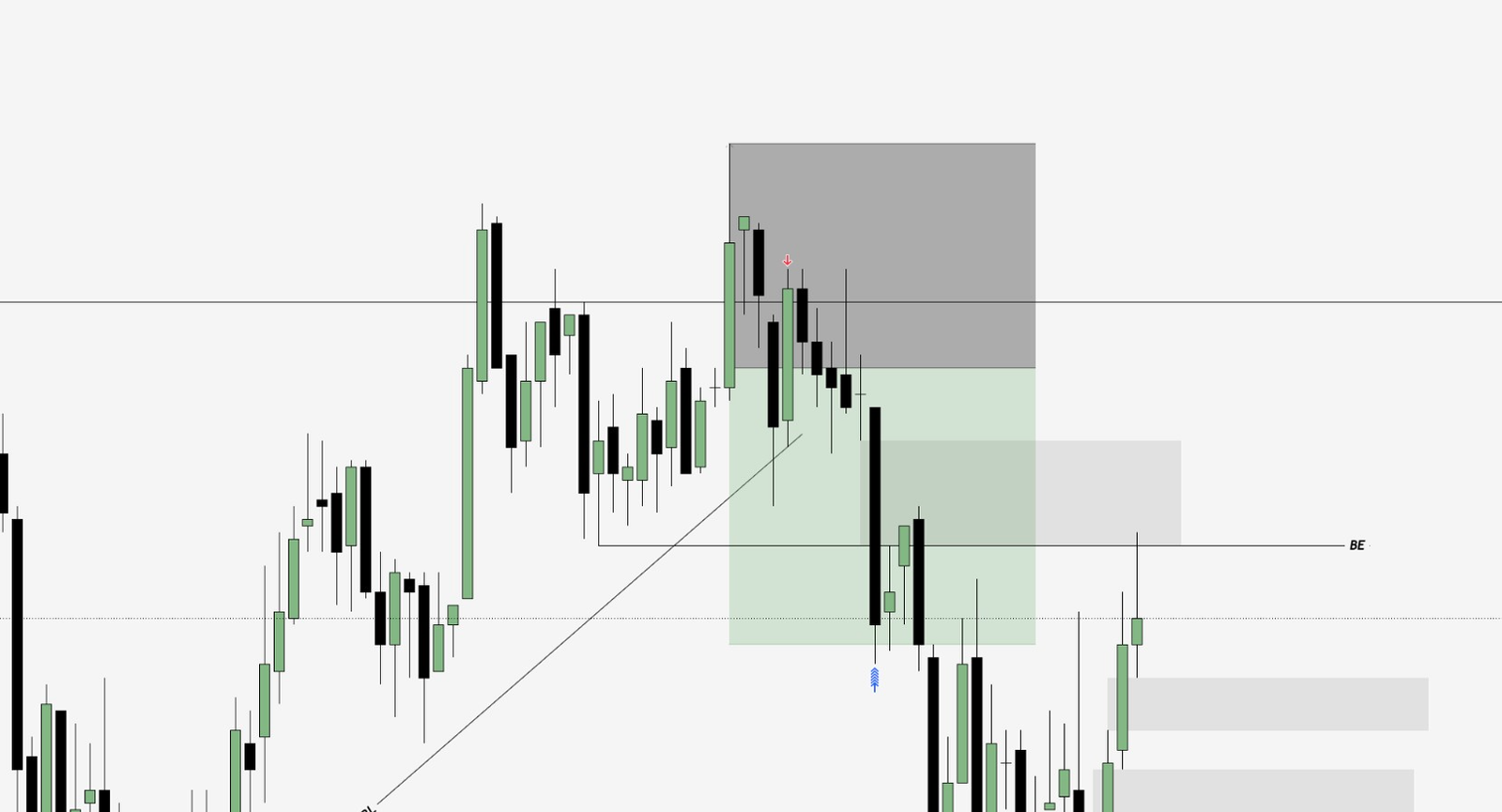
Trade Log · 2026-08-07Win  +$1,160
Example logged trade: a short entry from the marked zone, managed down to the breakeven line and beyond.
Setup
FVG + Liquidity Sweep
Fund
MNQ
Direction
Short
Result
Win
Points Gained
+42.5
R:R Ratio
1.25R
MAE / MFE
6.0 / 48.0 pts
Session
Asia
Trade Rating
★★★★★
Followed Rules
Yes
Key MetricsThis Month
Win Rate64%28 W / 16 L
Profit Factor1.8gross W ÷ gross L
Avg R:R (Expectancy)1.6Rper decisive trade
Rolling Win Rate70%trailing 10 decisive
Best Trading DayTuesday+$312 avg / day
Best Inversion Candle5 min73% win rate
Avg MAE on Winners7.4 pts
Avg MFE on Losers9.1 pts
Deep Trade Filter4 active
Direction: Short Session: NY AM Liquidity Sweep: Yes Min ★ Rating: 4 SetupFundDay of WeekR:R RangeDate Range
Matches  19 / 214 trades Win rate  79% Net  +$6,480

Built by a trader who was tired of guessing.

Killzonda started as a single-file journal for my own futures trading — I wanted to know, in plain numbers, which setups, sessions, and conditions actually made me money instead of just feeling right.

It grew into the exact tool I wished existed: fast to log, honest about breakeven days, and built around the way liquidity-sweep and inversion-based setups actually get planned and reviewed.

The philosophy Two questions decide whether you get better: did I follow my rules today, and are those rules actually making money? Killzonda is the one page — filled in after the close — that answers both. No spreadsheet, no spin, just what actually happened.

All the metrics. A quarter of the price.

One plan, every feature. Try it free for 7 days — no charge until the trial ends, cancel anytime.

Killzonda
$19 / mo
Full metrics suite, P&L calendar, Deep Trade Filter, rules module and prop-firm tracking. Everything included — no higher tier.
Typical premium journal
$60–$90 / mo
Comparable analytics tier from the well-known trade journals — bundled with broker integrations and order-flow tooling built for a different kind of trader.
Roughly a quarter of the price for the numbers that actually move the needle — win rate, profit factor, R:R expectancy, MAE/MFE, rolling win rate, and session & setup breakdowns.
Monthly
$19/mo
Billed monthly
  • Unlimited trade logging with screenshots
  • Full P&L Calendar & weekly totals
  • Key Metrics analytics dashboard
  • Trade Filter & Rules/Checklist
  • Prop Firm P&L tracking
  • Full JSON export of your data, anytime
Start Free Trial
Save ~21%
Annual
$180/yr
Billed yearly — works out to $15/mo
  • Unlimited trade logging with screenshots
  • Full P&L Calendar & weekly totals
  • Key Metrics analytics dashboard
  • Trade Filter & Rules/Checklist
  • Prop Firm P&L tracking
  • Full JSON export of your data, anytime
Start Free Trial

Questions, answered

What Killzonda records, what it calculates for you, and how the rest of it works.

The method

Why doesn't Killzonda connect to my broker?

On purpose. Automatic import turns a journal into a data dump you skim past once. Typing the trade in yourself — the setup, the session, the sweep, how you managed it — is the review, and it's where you catch the broken rule or the "A+" that was really a B. Killzonda keeps the input manual and makes the analysis automatic.

Isn't manual logging slow?

A trade takes well under a minute. Only date, time and setup name are required; everything else is optional and there to sharpen the filters later. Most traders log a full day in a couple of minutes after the close.

Is this only for ICT / liquidity-based trading?

It's built around the way intraday futures setups get planned and reviewed, so fields like Liquidity Sweep, Draw on Liquidity and Inversion Candle timeframe are first-class. If you don't trade that style, leave them blank — the core log, calendar and metrics work for any discretionary intraday approach.

What it tracks

What can I record on each trade?

Setup name, futures contract or fund, direction, result, points gained or lost, P&L per account and number of accounts, position size, stop and target, R:R ratio, and time in trade.

Then the context: session, day of week, liquidity sweep and sweep direction, draw on liquidity, inversion-candle timeframe, MAE and MFE, a star rating, and whether you followed your rules.

And the review: written notes on how you felt about the trade, your analysis and execution, your trade management, and what to improve — plus your chart screenshots.

Do I have to fill in every field?

No. Log as much or as little as you want. The more you capture, the more the Deep Trade Filter can tell you later — but a bare entry with just the essentials still lands on the calendar and in your metrics.

Can I attach chart screenshots?

Yes — every trade leads with its screenshot. Images are resized and compressed in your browser before they're saved to your account.

Can I log a day I didn't trade?

Yes. No-trade days are recorded so your discipline — and your calendar — stays honest.

Does it track prop-firm accounts?

Yes. Evaluation purchases and payouts are logged separately from trade P&L — broker, stage, amount, number of accounts, payout and dates — so you see your real all-in return across every funded account.

Where do my trading rules live?

In the app, on the same screen you log from: your Core Rules, an A++ Confluence checklist, Risk Management Rules, and a daily Pre-Market Checklist.

What it calculates

Which metrics does it compute?

Win rate, profit factor, rolling win rate (your last 10 decisive trades), R:R expectancy, best trading day of the week, MAE/MFE on winners and losers, best-performing inversion-candle timeframe, and long-vs-short win rate and average P&L. All recalculated the moment you save a trade.

Can I analyse just one slice of my history?

Yes. The Deep Trade Filter stacks conditions — setup, session, direction, liquidity sweep, day of week, rating, R:R range, date range and more — and shows the win rate and net P&L for exactly that slice.

What time ranges can I view?

All time, this week, this month, year to date, or a custom date range.

Billing

How much does it cost?

$19 per month, or $180 per year (about $15 per month). Every feature is included on both — there is no higher tier.

How does that compare to other journals?

It's roughly a quarter of what the well-known trade journals charge for a plan with a full analytics suite. You're not paying for broker integrations and order-flow tooling you won't use for discretionary intraday trading.

Is there a free trial?

7 days, with every feature unlocked. You won't be charged until it ends, and you can cancel anytime before then.

How do I cancel?

From the billing portal inside the app, any time. You keep access until the end of the period you've already paid for.

What payment methods do you take?

Card, processed by Stripe. Killzonda never sees or stores your card details.

Your data

Who can see my trades?

Only you. Each account's data is isolated at the database level — no other user, signed in or not, can read your entries.

Can I export my data?

Yes — download a full JSON backup of every trade and no-trade day whenever you want, and re-import it later.

Can I import from another journal or a spreadsheet?

Not yet. Import currently accepts Killzonda's own JSON backup format; CSV import from other tools isn't supported.

Do you sell my data?

No.

Practical

Is there a mobile app?

No native app — Killzonda runs in any modern browser, on desktop or phone. Nothing to install.

Is it only for futures?

It's designed and tuned for futures day trading. You can log other instruments, but some fields and metrics assume an intraday futures context.

Do you offer team or multi-user accounts?

No — accounts are individual.

Start logging trades that actually teach you something.

7 days free. Takes under a minute to create an account.

Start Free Trial →